
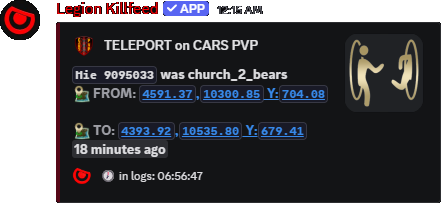
Teleport records

Teleport Feed for Movement Review

Post teleporter usage and suspicious movement context so staff can separate planned travel from movement that needs review.

Movement review

Teleport Feed records movement that should not be left to memory.

On servers with custom teleporters, it helps show when players used expected travel points.

When movement looks suspicious, staff get records they can compare with configured teleport files, locations, and support reports.

Teleport event post
Teleport records show movement staff may need to review.

What staff can verify

Owners can offer custom travel systems without losing visibility. Players get convenience; staff still get records.

For support, it reduces “they appeared out of nowhere” arguments because staff can check the feed.

Commands

  1. Use /settings channel assign to choose where teleport posts go.
  2. Use /settings configure locations and adjust teleports to turn teleport location posting on or off.
  3. /generate teleports file builds a teleporter file from DayZ Editor marker items.
  4. Use /last locations when staff need surrounding movement records.

Hidden destinations

  • Keep teleporter review channels staff-only if the destinations are meant to be hidden.
  • If a server uses public teleporters, add clear player-facing rules so feed records are easier to interpret.

Location choices explained

/settings configure locations controls how much map information Legion shows in feed posts. Use it to balance player excitement against base privacy and rule enforcement.

  • On shows location information for that feed when Legion can calculate it.
  • Off hides location information for that feed.
  • Both is for owners who want both readable location text and the linked location style where supported.
  • Near gives players an approximate area instead of exposing the exact spot.
  • No Link keeps location text but removes the clickable map link.
  • Near No Link is the privacy-heavy option: approximate area text without the clickable map link.

For public player channels, Near or Near No Link hides exact positions. For staff-only channels, exact or linked locations give staff the coordinates needed for review.

Commands and options

Copy the command name, then fill in the Discord options listed under it. Discord shows the option fields after the command is selected.

/settings channel assign
  • channel: choose the Discord channel that should receive the feature posts.
  • feature/feed choice: choose the Legion feed or output type being assigned.
/settings configure locations
  • feature location options: choose how each supported feed shows coordinates.
  • Choices include On, Off, Both, Near, No Link, and Near No Link where supported.
/generate teleports file
  • spawner_file: DayZ Editor/ObjectSpawner JSON attachment.
  • teleport_item: item used to mark teleport-from positions.
  • safe_item: item used to mark teleport-to positions.
  • teleport_name: optional output file name.
/last locations
  • No extra typed fields.

Related features

Site search

Find pages, tools, and guides

Copyright