
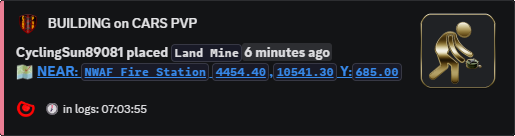
Suspicious build review
Glitch Review Feed for Suspicious Build Items
Post build placement records that may need staff review for clipped, hidden, or rule-breaking items.
Build checks
Glitch Feed helps staff find placements that deserve a closer look.
Hidden storage, clipped objects, and suspicious base work can be missed in general build records.
The feed does not replace staff judgement. It gives staff a better starting point: item, player, and location context.
What staff can review
Owners use it to reduce the time spent chasing vague reports like “they glitched storage into a wall.”
It also helps honest players trust that staff are watching the same kinds of exploit attempts across the whole server.
Commands
- Use
/settings configure glitchfeedto configure glitch review posting. - Use
/settings channel assignso review posts land in a staff channel. - Use
/settings configure locationsand adjustglitchif these records should include location detail. - Use
/last locationswhen checking the area around a suspicious placement.
Review rules
- Keep this feed private. Public suspicious-placement posts can teach people what to abuse.
- Use Build Feed and Base Radars with this feed when reviewing protected bases.
Commands and options
Copy the command name, then fill in the Discord options listed under it. Discord shows the option fields after the command is selected.
/settings configure glitchfeed/settings channel assign/settings configure locations/last locations