Automatic bans

Autoban Rules for DayZ Console Servers

Set which server rules ban automatically, which rules only alert staff, and which trusted players are exempt.

Rule control

Autoban only acts where an owner enables it.

Map-wide PVE Mode handles general no-kill rules. Base Radar toggles handle marked areas with their own rules. Cheat controls handle swimmer, skywalk, and PC-cheat detections.

That lets a PVE server still run approved PVP zones, staff-only exceptions, and alert-only areas without turning every incident into a ban.

Where automatic bans come from

Map-wide PVE Mode: the broad rule for kills or deaths outside special areas.

Base Radars: area-specific rules for PVP zones, protected bases, trader areas, events, or restricted places.

Cheat checks: separate controls for swimmer, skywalk, and PC-cheat detections.

Whitelists: exceptions for trusted players, handled separately for map-wide rules and radar-specific rules.

Map-wide rule

Use /settings autoban config when the whole map has a PVE rule.

Choose Kill when killers outside approved PVP areas should be banned. Choose Death for one-life style rules where the player who died is banned. Choose Off when staff want alerts and review without whole-map automatic punishment.

Zone rule

Use Base Radars when one area has different rules.

Create the zone with /base radar create. Leave ban_on_kill off inside allowed PVP zones. Turn on only the zone bans that match the written rule for that area: build, kill, death, entry, or logout.

Exceptions

Use whitelists before a rule goes live.

/settings autoban whitelist protects selected gamertags from whole-map PVE Mode bans. Radar whitelists protect players only inside that specific radar. Keep those two exception lists separate.

Owner example

PVE map with marked PVP zones

Set whole-map PVE Mode to Kill. Create a Base Radar around each PVP zone with /base radar create. Use circle coordinates for simple arenas or polygon coordinates for towns and uneven event areas. Leave ban_on_kill off inside those PVP radars so normal combat is allowed there.

Outside those radar zones, the whole-map PVE Mode rule still applies. Staff can compare the kill location against the radar boundary during review.

Cheat autoban alert example

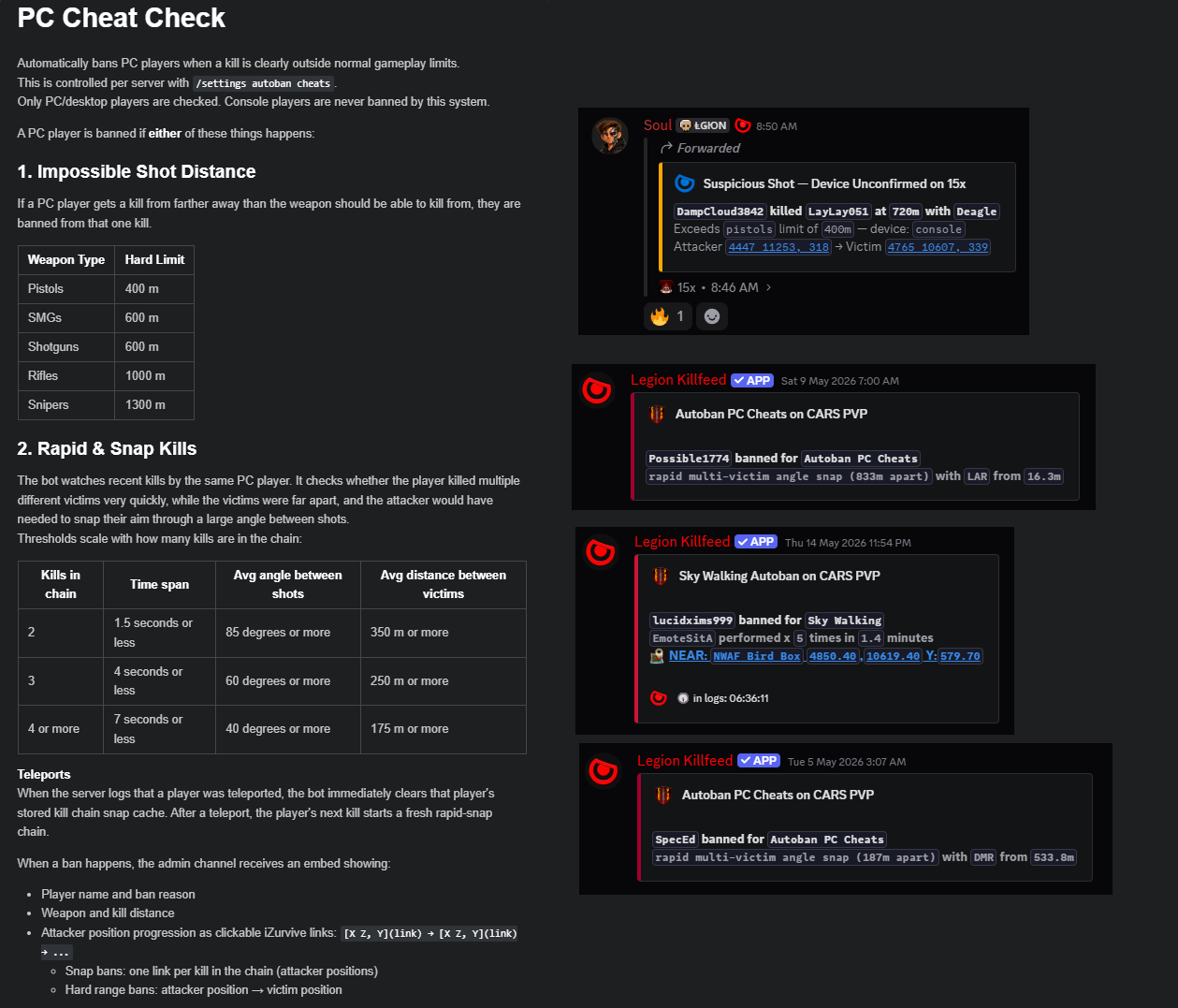
Cheat checks are only one part of Autoban.

Cheat-check alerts cover swimmers, skywalk, and PC-cheat detections. Whole-map PVE Mode and Base Radar zone bans are separate controls.

Ban by account ID output

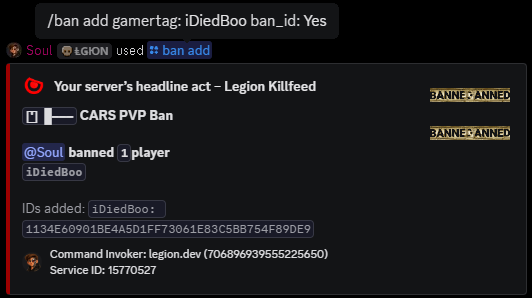
Manual ban output is separate from automatic rules.

Autoban can write to the Nitrado banlist when a configured rule triggers. Manual ban commands still exist for staff decisions that should not be automatic.

Base Radar PVP zone alert

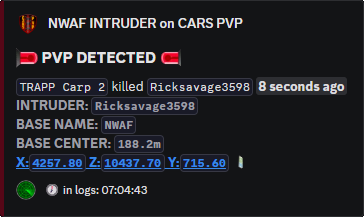
Base Radars mark PVP exceptions on PVE maps.

The radar defines the exception area. Outside the radar, whole-map PVE Mode can still ban killers. Inside the radar, the radar's own toggles decide what happens.

Whole-map PVE Mode

/settings autoban config

Choose Kill, Death, or Off. Use Kill for normal PVE anti-kill enforcement. Use Death for one-life style servers where the victim is removed after dying. Use Off when staff want review without whole-map automatic bans.

Cheat checks

/settings autoban cheats

Enable or disable swimmers, skywalk, and pc_cheats. These are cheat-specific autobans, not the whole Autoban feature.

Exceptions

/settings autoban whitelist

Use Add, Remove, or View for whole-map PVE Mode exceptions. Use commas when adding or removing more than one gamertag.

Base Radar zone bans

Use /base radar create, not separate custom-zone pages.

Create a radar with coords, zone_owner, optional channel and role settings, and only the ban toggles that match the area rule. X,Z plus a radius creates a circular radar. X,Z;X,Z;X,Z creates a polygon radar when three or more coordinate pairs are provided.

Use /base radar edit to change the owner, channel, shape, role, location display, ping setting, and ban toggles later. Use /base radar whitelist for players who should be exempt from that specific zone's bans.

Base Radar ban toggles

Each radar can stay alert-only or ban automatically for specific event types.

Toggle Turn it on for Leave it off for
ban_on_build Protected bases, no-build areas, staff-only structures. Normal bases where owners or faction members build inside the radar.
ban_on_kill No-kill areas, PVE protection zones, restricted event spaces. Allowed PVP zones. This is the key setting for PVE maps with marked PVP areas.
ban_on_death One-life style zones where the victim is banned after dying inside the radar. Normal PVE anti-kill rules where the killer should be handled with ban_on_kill.
ban_on_entry Restricted zones where entering is the offence. Faction bases, trader zones, or arenas where entry only needs an alert.
ban_on_logout Small restricted areas where logging out inside the zone breaks the rule. Large zones where normal disconnects would catch innocent players.
location Radar posts that should include location detail. Public channels where exact locations expose bases or hidden event areas.
base_ping Radar posts that should mention the assigned role. Quiet staff logs or high-volume zones where pings would spam Discord.

Commands and options

Copy the command name, then fill in the Discord options listed under it. Discord shows the option fields after the command is selected.

/settings autoban config
  • mode: choose Kill, Death, or Off. Kill bans the killer for PVE anti-kill rules. Death bans the player who died for one-life style rules. Off leaves the map-wide autoban rule disabled.
/base radar create
  • coords: X,Z for a circle, or X,Z;X,Z;X,Z for a polygon.
  • radius: used for a circle radar.
  • zone_owner: owner name shown for the radar.
  • zone_channel: optional Discord channel for alerts.
  • zone_role: optional role to ping.
  • location: Exact, Near, No Link, Near No Link, or Off depending on how much location detail should show.
  • ban_on_build, ban_on_kill, ban_on_death, ban_on_entry, ban_on_logout, ban_on_disconnect: turn on only the bans that match that area rule.
  • base_ping: controls whether the configured role/channel is pinged.
/settings autoban whitelist
  • setting: Add, Remove, or View.
  • gamertag: optional unless adding or removing players; use commas for more than one gamertag.
/settings autoban cheats
  • swimmers: Enable or Disable.
  • skywalk: Enable or Disable.
  • pc_cheats: Enable or Disable.
/base radar edit
  • Select the existing radar, then change owner, channel, shape, role, location display, pings, or ban toggles.
/base radar whitelist
  • setting: Add, Remove, or View.
  • gamertag: player name or comma-separated player names for that radar exception list.

Related features

Site search

Find pages, tools, and guides

Copyright