
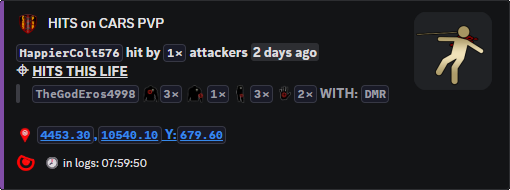
Damage records
Hit Feed and Damage Context
Post weapon hits, damage context, distance, and fight pressure before the final kill message appears.
Before the death
Hit Feed shows the fight before Killfeed shows the result.
When logs provide it, staff can see who hit whom, with what, and from what kind of distance.
That context helps with combat reports, suspicious shots, event disputes, and fights where the death message alone is not enough.
What staff can prove
Owners use it to settle disputes faster: “who shot first,” “was it a third party,” and “was this near a protected area” are easier to answer.
It also gives PVP communities more visible action without waiting for a kill to happen.
Commands
- Use
/settings channel assignto choose the Discord channel for hit posts. - Use
/settings configure locationsand adjusthitif you want hit locations shown, hidden, nearby only, or posted without map links. - Use
/last pvpor/last locationswhen staff need to review recent combat around a complaint.
Channel volume
- Hit feeds can be busy on high-pop servers. Put them in a dedicated channel if players only want kills in the public feed.
- For PVE servers, pair this with PVE Feed and Autoban rules so damage is reviewable before punishment is applied.
Commands and options
Copy the command name, then fill in the Discord options listed under it. Discord shows the option fields after the command is selected.
/settings channel assign/settings configure locations/last pvp/last locations