
Base activity
Base Building and Placement Feed
Post building, dismantling, burying, unburying, packing, placing, and destruction records so staff can review base activity from logs instead of screenshots.
Build records
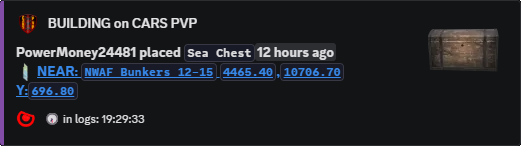
Build Feed shows what changed around a base.
When the logs expose it, Legion posts the player, item, action, and allowed location detail for base-related events.
Staff can use those records for raid reviews, griefing reports, base cleanup, faction disputes, and protected-area enforcement.
What staff can prove
When a player says a gate disappeared, a tent moved, or storage was buried, staff can start from the feed record instead of asking for guesses. Staff can check what changed, who was nearby, and when the action reached the logs.
Pair it with Base Radars when a protected base needs alerts, whitelists, or automatic bans inside a specific area.
Commands
- Use
/settings channel assignto choose where build posts go. - Use
/settings configure locationsand adjustbuildif build activity should show exact locations, nearby locations, or no map links. - Use Base Radars if specific bases need separate channels, owners, whitelists, or ban toggles.
- Use
/last locationswhen staff need to review recent activity around a spot.
Channel and privacy settings
Large servers usually keep Build Feed staff-only because public build posts can expose active bases. Smaller faction servers may choose public or faction channels when the goal is visible territory pressure.
For protected bases, use Base Radar whitelists so trusted owners do not trigger that radar's bans or alerts.
Commands and options
Copy the command name, then fill in the Discord options listed under it. Discord shows the option fields after the command is selected.
/settings channel assign/settings configure locations/last locations