
Watched map areas
Base Radars for DayZ Communities
Mark bases, PVP arenas, faction territory, trader areas, raid zones, or restricted places with channels, owners, roles, whitelists, alerts, and optional bans.
Area rules
Base Radars turn map areas into Discord-managed rules.
A circle radar uses one X,Z point and a radius. A polygon radar uses three or more X,Z points for towns, compounds, and uneven event areas.
Each radar can have its own owner, alert channel, ping role, location display, whitelist, and separate ban toggles for build, kill, death, entry, logout, or disconnect events.
Zone rule examples
A faction base can alert its owners, a raid zone can notify staff, and a PVP arena can have different punishment rules from the surrounding PVE map.
For players, it makes rules easier to trust because staff can point to a defined zone instead of arguing over rough locations.
Create and edit radars
Use /base radar create for both circle and polygon zones. A single X,Z coordinate with a radius makes a circle; three or more coordinate pairs make a polygon.
After creation, use /base radar list to confirm the zone ID and /base radar edit when the boundary, channel, owner, role, ping, location display, or ban toggles need changing.
Use /base radar whitelist for players who should be ignored by that radar's zone bans.
Autoban functionality
Running PVE with PVP zones
Base Radars let an owner run a mostly PVE server while still allowing fighting inside marked PVP zones. The important part is that the whole-map rule and the zone rule are separate controls.
- Set the wider server rule with
/settings autoban config. UseKillto ban killers outside approved PVP areas,Deathfor one-life style victim bans, orOfffor review without automatic bans. - Create each PVP area with
/base radar create. Use a circle for simple arenas and a polygon for towns, castles, trader surroundings, or uneven event areas. - For that PVP zone radar, set
ban_on_killtoOff. That tells Legion not to autoban normal PVP kills inside that marked zone. - Leave the wider PVE rule active outside the radar. A player killing outside the marked PVP zone can still trigger the PVE autoban rule, while fighting inside the zone is treated as allowed.
- Use
/base radar listto confirm the zone and/base radar editif the boundary or ban toggles need adjustment.
For servers advertising PVE map with PVP zones: protect the whole map, mark the PVP areas, and review each kill against the radar boundary.
Setup guardrails
- Do not use GPS-style map labels when the command asks for X and Z world coordinates.
- Use alert-only zones for staff review. Use autoban toggles only for written rules.
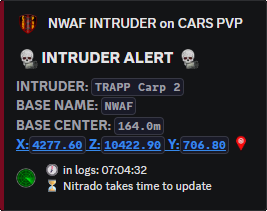
Intruder alerts show the radar that fired.
The intruder alert is the normal review side of a radar: who entered, which base or area was involved, and where staff should look.
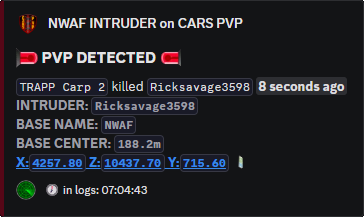
PVP alerts mark kills inside the allowed zone.
For mixed-rule servers, this is the visible proof that a kill happened inside the marked PVP area instead of the protected PVE map.
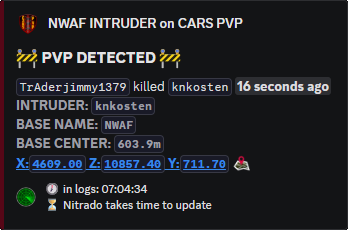
Kill alerts are review context before they are punishment.
Leave ban_on_kill off when the zone allows combat. Turn it on only when the area rule says kills inside that radar should be banned.
Create
/base radar create
Use this for circles and polygons. The coordinate format decides the shape.
Maintain
/base radar edit
Use this when the shape, owner, channel, role, location display, base ping, whitelist, or ban toggles need updating.
Audit
/base radar list
Use this after creating a radar so staff can confirm the zone ID and current settings before enforcing bans.
Base Radar zone bans
Use /base radar create, not separate custom-zone pages.
Create a radar with coords, zone_owner, optional channel and role settings, and only the ban toggles that match the area rule. X,Z plus a radius creates a circular radar. X,Z;X,Z;X,Z creates a polygon radar when three or more coordinate pairs are provided.
Use /base radar edit to change the owner, channel, shape, role, location display, ping setting, and ban toggles later. Use /base radar whitelist for players who should be exempt from that specific zone's bans.
Commands and options
Copy the command name, then fill in the Discord options listed under it. Discord shows the option fields after the command is selected.
/base radar create/base radar list/base radar edit/base radar whitelist/settings autoban config