
PVP feed
DayZ Killfeed for Console Servers
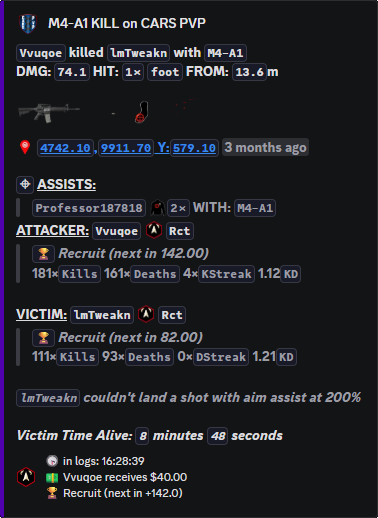
Post clean PVP kill records with killer, victim, weapon, distance, and the location detail your server allows.
Public fight record
Killfeed is the main PVP record for a DayZ server.
Legion turns player-versus-player kill logs into Discord posts that players can follow and staff can review.
Use it for faction bragging, kill disputes, public fight history, and staff checks. Survival and environment deaths belong in PVE Feed.
What staff can prove from it
Players see who killed who without staff posting screenshots by hand. Staff can answer disputes like “who shot first,” “what weapon was used,” and “was this near a protected area” without digging through raw logs first.
Because Nitrado log timing is not instant, describe posts as semi-real-time or as close to real-time as Nitrado allows.
Commands
- Use
/settings channel assignto send kill posts to the correct Discord channel. - Use
/settings configure locationsand setkillfeedto the location style you want: exact, nearby, text-only, or off depending on how much information your community should see. - Use
/settings colorand/settings configure logoif you want the feed to match your server branding. - Use
/last pvpwhen staff need to review recent PVP records instead of scrolling the public feed.
Killfeed channel settings
Put the public Killfeed in the channel players already watch for fights. Keep staff review commands in admin channels so staff can check older PVP records without turning the public feed into a support thread.
If map links reveal too much, change the location setting instead of turning the feed off. That keeps activity visible while protecting bases and active fights.
Commands and options
Copy the command name, then fill in the Discord options listed under it. Discord shows the option fields after the command is selected.
/settings channel assign/settings configure locations/settings color/settings configure logo/last pvp