
Access lists
Ban, Whitelist, and Priority Management
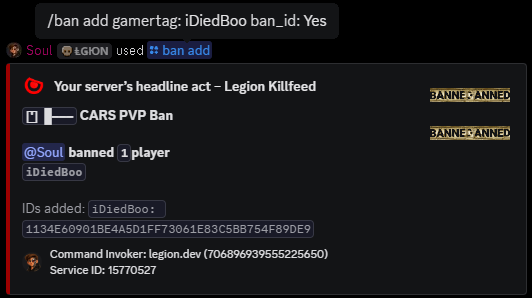
Add, remove, and review bans, whitelist entries, and priority entries from Discord without editing server lists by hand.
Staff lists
Ban, whitelist, and priority commands control different server lists.
Ban commands remove problem players. Whitelist commands manage who can join a whitelisted server. Priority commands help selected players with queue handling.
These are deliberate staff actions, separate from Autoban. Staff can still manage the lists manually when automatic rules are disabled.
When staff use each list
Use bans when a player should not be allowed back, whitelist entries when a private or event server only accepts approved players, and priority entries when trusted players need queue handling.
Keep ban reasons clear so the next staff member can understand the action without searching old chat messages.
Commands
- Use
/ban addwhen staff need to ban a gamertag. - Use
/ban viewto check current ban records. - Use
/whitelist add,/whitelist remove, and/whitelist viewfor whitelist management. - Use
/priority add,/priority remove, and/priority viewfor priority list management.
Do not mix up whitelist types
The server whitelist controls who can access the server when whitelist access is enabled. Autoban whitelist controls who is ignored by a specific automatic enforcement rule.
Use the normal whitelist commands for access control. Use Autoban or Base Radar whitelist commands only for automatic-ban exceptions.
Commands and options
Copy the command name, then fill in the Discord options listed under it. Discord shows the option fields after the command is selected.
/ban add/ban view/whitelist add/whitelist remove/whitelist view/priority add/priority remove/priority view