
Activity maps
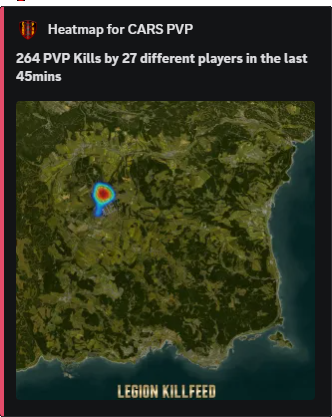
Kill, Damage, and Location Heatmaps
Turn kills, damage, locations, and server activity into map visuals so owners can see where players actually spend time.
Map evidence
Heatmaps show patterns that single feed posts cannot show.
Owners can see where PVP gathers, where players travel, and which towns, bases, or trader areas are pulling attention.
They are useful after wipes, events, map edits, and rule changes because they show actual player movement instead of guesses.
What heatmaps prove
For selling a server, heatmaps are strong proof of activity. They show that the world is being used, not just advertised.
For balancing, they help owners decide where to add events, move traders, adjust loot, or open a PVP area.
Commands
- Use
/heatmapsto generate heatmap views for server activity. - Use
/last locationswhen staff need recent location records instead of a broad map view. - Compare heatmaps with Leaderboards when deciding whether activity is healthy or concentrated around one group.
Privacy settings
- Heatmaps are for owner decisions, not just staff discipline. Use them to improve server design.
- Do not publish exact location maps if your rules protect hidden bases.
Commands and options
Copy the command name, then fill in the Discord options listed under it. Discord shows the option fields after the command is selected.
/heatmaps/last locations