Maps, player presence and status

Heatmaps, Pinmap, Players Online and Server Status

Heatmaps turn recent log positions into readable map images, Pinmap gives staff a cleaner view of current player locations, and status feeds show server health and online player counts in Discord.

Map and status views

Kill heatmap

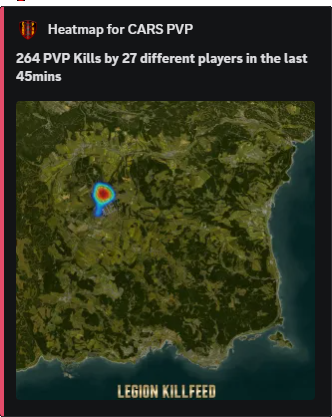
Kill heatmap plots where PVP deaths happened during the selected timeframe. Instead of reading fifty separate kill posts and trying to remember the map, owners can see the fight pressure in one image: coast fights, NWAF fights, bunker fights, base raid areas, event zones or repeat problem areas.

The dot comes from the death location in the kill record. If several players die around the same area, the overlay becomes stronger there, which makes repeated fight locations stand out quickly.

Legion PVP kill heatmap example
Kill heatmaps show fight concentration from recent PVP death points.

Damage heatmap

Damage heatmap uses hit records instead of only death records. It shows where bullets, explosions or other damage events were logged, so it catches fights that never became killfeed posts. This helps when players claim “nothing happened there” but the hit feed shows shots, bleeding, knockouts or damage in that area.

Because it is based on damage positions, it is better for reading skirmishes, ambush starts, warning shots, raid pressure and third-party fights than a kill-only map.

Location heatmap

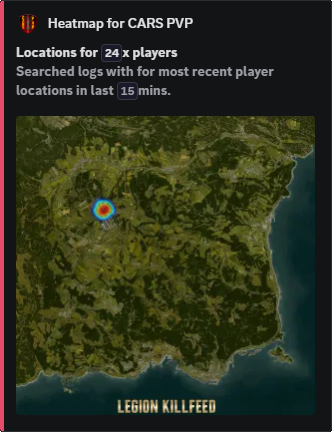
Location heatmap uses player position records. It is not about who killed who; it shows where players have been moving, logging, travelling and gathering. That makes it useful for finding busy traders, camping routes, spawn paths, faction hubs, quiet corners and event attendance.

Owners can use it after a wipe, event night or rule complaint to see whether players actually went near the area being discussed.

Legion location heatmap example
Location heatmaps show recent player movement density from player-position log lines.

Pinmap

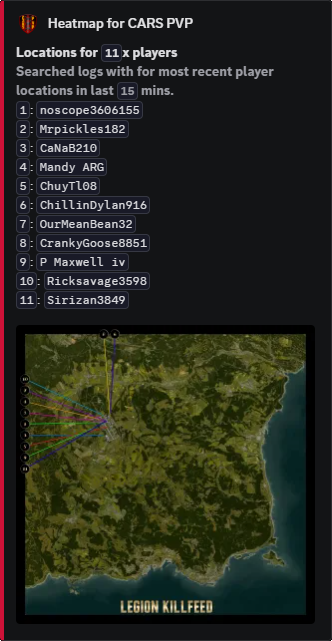
Pinmap is a snapshot-style location view. Instead of blurring repeated activity into a heat overlay, it takes the latest known position for each player and places numbered pins on the map. Player names are pushed to the edge with guide lines so the middle of the map does not turn into unreadable name spam.

Use heatmaps to understand density over time. Use Pinmap when staff need to see who is where right now, or who was most recently recorded at each point.

Legion location pinmap example
Pinmap uses latest player positions, numbered map pins and outside labels so crowded groups stay readable.
Legion player locations output
Location output can sit beside maps when owners need both a visual view and exact player coordinate context.

Players Online

Players Online can be shown as a text post, a renamed voice channel or a command response. Owners can decide whether the list only shows names and counts, or whether the text version includes location details for staff-style visibility.

Legion players online status example
Players-online output can be shown through channel posts, voice naming or commands.

Server Status

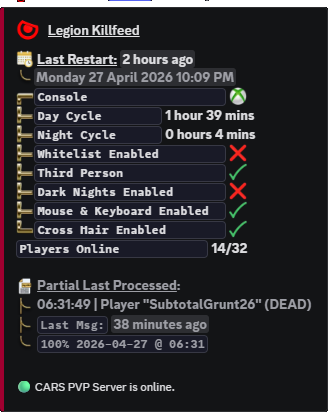
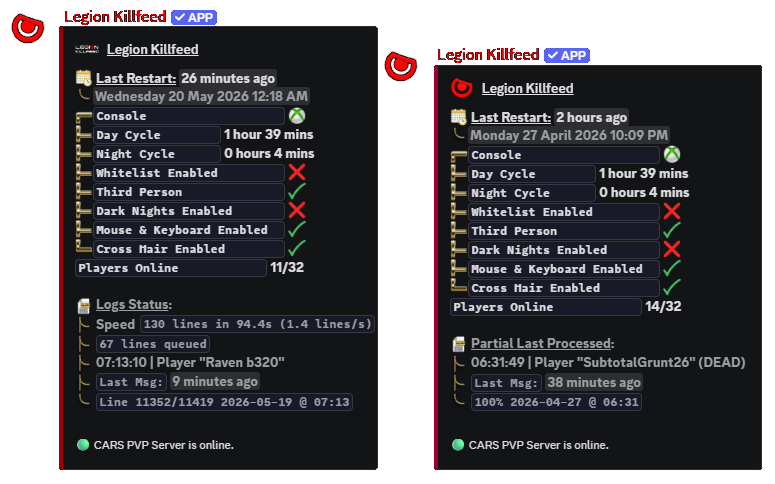
Server Status shows Nitrado-backed state in Discord so staff can see whether the server is online, restarting, stopped or behaving badly without opening the Nitrado panel first. It pairs with players online and graph output when owners are checking restart complaints, lag reports or downtime.

Legion server status feed example
Status posts make server state visible without opening Nitrado first.

How each map works

View How Legion builds it What it answers
Kills Reads PVP kill records for the chosen timeframe, takes the victim death coordinates, places those points on the selected map and blends repeated points into stronger heat. Where are PVP deaths actually happening: raid targets, event zones, high-traffic towns, military areas or the same suspicious corner over and over?
Damage Reads hit and damage records, then plots where damage was logged. A fight can appear here even when the killfeed never gets a final death. Where are shots, melee, explosions, knockouts or damage trades happening before a kill is confirmed?
Locations Reads player position records from the log and turns repeated visits into a density overlay. It cares about movement and presence, not kills. Where have players been travelling, camping, trading, gathering, spawning or avoiding during the selected period?
Pinmap Uses the latest known position for each player, draws numbered pins, places the names around the border and connects each label back to its pin with a line. Who is at each current or last-known position without the map being covered by overlapping names?
Server Graph Uses Nitrado server data for graph-style status output over the selected timeframe instead of relying on a single “is it online now” check. Did restarts, server state changes or resource problems line up with the time players reported lag, crashes or connection issues?

Settings that control maps and status

/heatmaps is the manual map command. The choice option selects Kills, Damage, Locations, Pinmap or Server Graph. time_frame selects 1 to 12 hours of source data. names controls whether the output tries to include player names where the selected view supports them.

/settings channel assign decides where each automatic map/status output lands. Heatmap Locations, Heatmap Kills, Heatmap Damages and Location Pinmap can be sent to different channels so owners can keep combat heat, movement heat and current-location views separate. Status, Text Plon and Voice Plon control the server status and players-online outputs.

/settings playersonline controls whether online players are posted as text, shown through a voice channel name, available through the player command, and whether the text list includes locations. It is the difference between a public “34 online” channel and a staff-facing list that includes who is online and where they were last seen.

Command paths

Command Options Use
/heatmaps
choice: Kills, Damage, Locations, Pinmap or Server Graph; time_frame: 1–12; names: On or Off. Generates the requested map/status view for a selected server.
/settings channel assign
Heatmap Locations, Heatmap Kills, Heatmap Damages, Location Pinmap, Status, Text Plon or Voice Plon. Routes map, status and players-online output.
/settings playersonline
text, voice, command, voiceprefix, txt_locations. Controls players-online output style and whether location detail appears in text lists.
/plon
Players online command output. Returns an accurate players-online response when enabled.

Related Legion features

Site search

Find pages, tools, and guides

Copyright