
Zone alerts and base protection
Base Radar Zone Alerts and Auto-banning system
Base Radar Alerts create named map zones for bases, traders, arenas and protected areas, then use player position and event logs to tell staff when players or combat events touch those areas.
What a Base Radar shows
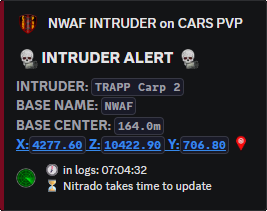
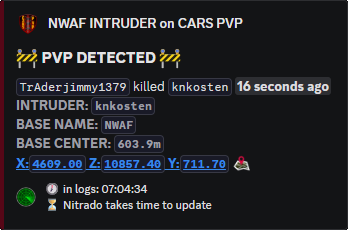
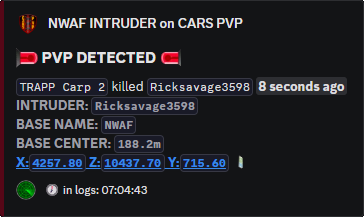
A Base Radar is a named zone tied to a real area on the DayZ map. It can be a circle around a base, a tighter shape around a trader, a polygon around an event compound, or a protected PVE area inside a PVP server. The alert can show the zone name, player, event type, owner context, whitelist state and location style the owner has enabled.
The same zone can watch different things depending on how it is configured: entry, build/dismantle, kill, death and logout/disconnect style events. That lets one radar act as a simple base trespass warning while another becomes a PVE protection zone that reports or bans PVP activity inside a protected area.
How it works
Staff define the watched area with a name, map location, shape and radius or polygon points. Legion then reads the same log data used by the feeds and checks whether the player position or event position lands inside that stored zone. When it does, the post is formatted as a zone alert instead of a raw coordinate problem.
The owner whitelist controls who is allowed to be treated as an owner or permitted player for that base. Role ping controls whether the alert mentions the assigned Discord role. The ban toggles decide whether the radar only reports, or whether a matching build, kill, death, entry or logout event should trigger an automatic ban when the server's rule set calls for it.
That makes Base Radar useful for more than one job. A PVE server can make PVP areas and protected areas behave differently. A faction server can give each faction its own territory alerts. A trader server can watch combat around a safe area. A base owner can receive entry warnings without needing access to every other moderation feed.
Base owner self-management
Base Radar Owner commands are for self-management of channel access and radar ignore lists. A Base Radar Owner can add or remove the Discord role that gives people access to their base radar channel, and can add or remove gamertags from the base radar ignore list without waiting for staff to do every small change.
There are no additional settings to configure for that owner-side workflow. It gives players, admins and faction leaders more freedom without unnecessary oversight, while avoiding access to enforcement toggles, server-wide moderation controls or anything that could become a problem outside that base radar context.
Settings that control the radar
| Setting | Controls | Use |
|---|---|---|
/base radar create |
Zone name, type, channel, role ping, centre point, circle radius or polygon points, and which actions should report or ban. | Creates the watched area and decides whether it behaves like a warning zone, protected area, faction territory or enforcement zone. |
/base radar edit |
The existing zone's alert channel, owner role, location, radius, polygon, entry/build/kill/death/logout checks and ban toggles. | Changes a live radar without deleting the zone history or rebuilding the base owner setup. |
/base radar whitelist |
Gamertags ignored by the radar for that zone. | Keeps owners, faction members, builders, event staff or approved visitors from being treated as intruders by their own radar. |
/base owner manage |
Owner-side role access for the radar channel and gamertags on the base radar ignore list. | Lets Base Radar Owners manage channel access and ignored gamertags without extra settings or wider server moderation permissions. |
Command paths
| Command | Options | Use |
|---|---|---|
/base radar create |
Zone name, coordinates/shape, radius or polygon details and alert/ban choices. | Creates a radar zone. |
/base radar edit |
Zone selection and editable behaviour fields. | Updates zone settings. |
/base radar whitelist |
Zone/player whitelist settings. | Allows trusted players in the zone. |
/base radar delete |
Zone selection. | Deletes a radar zone. |
/base radar list |
Server selection. | Lists configured radar zones. |
/base owner manage |
Owner role access and base radar ignore-list controls. | Lets Base Radar Owners add/remove the role for their radar channel and add/remove gamertags ignored by that radar. |