
Killfeeds and feeds
PVP, PVE, hits, builds, flags, connections, status, batching and readable Discord routing.
DayZ console Discord bot
Legion Killfeed is a DayZ console server management bot for Xbox and PlayStation communities on Nitrado. It handles semi-real-time feeds, stats, heatmaps, base radar, tickets, scheduled edits, RPT context, Nitrado setup, autobans, player linking, moderation tools, economy systems and public web utilities from one subscription.
Quick links
PVP, PVE, hits, builds, flags, connections, status, batching and readable Discord routing.
Xbox App / PC-connected DayZ players, RPT device data, weapon plausibility, movement, timing, angle and snap checks.
Kill, damage, player-location, pin-map, status and activity intelligence.
Circular and polygon radars, ban-on-entry, ignore lists, owner controls and raid visibility.
cfggameplay.json, XML, validators, object spawner tools, spawn gear, trader tools and RPT debugging.
Ko-fi membership, Nitrado token setup, Discord channel creation, reactivation and server linking.
Positioning
Legion became known as the cheapest available broad-feature DayZ console killfeed bot because the minimum public Ko-fi tier starts at $5.50 USD per month and can cover up to 10 servers per Nitrado account. Higher monthly payments are optional support, not extra feature gates.
The important tools are not split into separate paywalls. Killfeed, PVE, stats, heatmaps, tickets, base radar, file tooling, setup support, moderation utilities and the wider command set are part of the same service model.
Legion is not built like a generic Discord bot with DayZ labels stuck on top. Its setup flow comes from Aggro PVP, DayZ Multi Tool, DaDS, console admin limitations, Nitrado log behaviour, and years of answering the same server-owner problems directly.
Many owners need validators, generators, editors and RPT debugging before they decide whether they want a bot. Legion’s paid and free tools work alongside each other.
Feeds
Posts killer, victim, weapon, distance and location context into Discord as close to real time as Nitrado allows. The feed is meant to be readable enough for staff and clear enough for players without forcing admins to dig through raw ADM lines.
Handles infected, animals, environment deaths and other non-player damage so PVE activity is not mixed into PVP-only channels. Mixed-rule servers can keep PVE and PVP reporting separate instead of hand-writing exceptions.
Shows damage context before a kill happens, including weapon and location details where available. Hitfeeds help staff review suspicious damage patterns, range false attacks, combat complaints and fights that do not end in immediate deaths.
Tracks construction, placement, dismantling and flag activity so staff can see what changed around bases. Base building and dismantle visibility matter on servers where raids and griefing complaints drive most tickets.
Fall kills are unique to Legion Killfeed. Other bots usually leave those deaths uncredited, but Legion tracks them because PVP players frequently jump or fall to avoid giving kill credit. Legion keeps the fight context and credits the kill where the data supports it.
Landmines normally do not credit the placer in DayZ logs. Legion tracks mine placements and links later landmine deaths back to the player who placed the explosive where appropriate, so trap kills count instead of disappearing as anonymous environment damage.
Connection feeds show joins, leaves and status changes. When RPT data exposes extra device or account context, Legion can use that data for review setup flows instead of relying only on names.
Legion batches feed embeds where needed so busy servers do not turn Discord into a spam wall. Batching keeps high-action logs readable while still preserving event context.
Feature visuals
PVP, PVE, hits, fall kills, landmine credit, status, connection and build embeds shown as real Discord-facing output.
Anti-cheat
Legion can automatically ban PC players when a kill is clearly outside normal gameplay limits. This is
controlled per server with
/settings autoban cheats
. Only PC/desktop players are checked. Console players are never banned by this system.
When a ban happens, the admin channel receives an embed with the player name, ban reason, weapon, kill distance and clickable iZurvive position links for the attacker and victim or the attacker position chain.
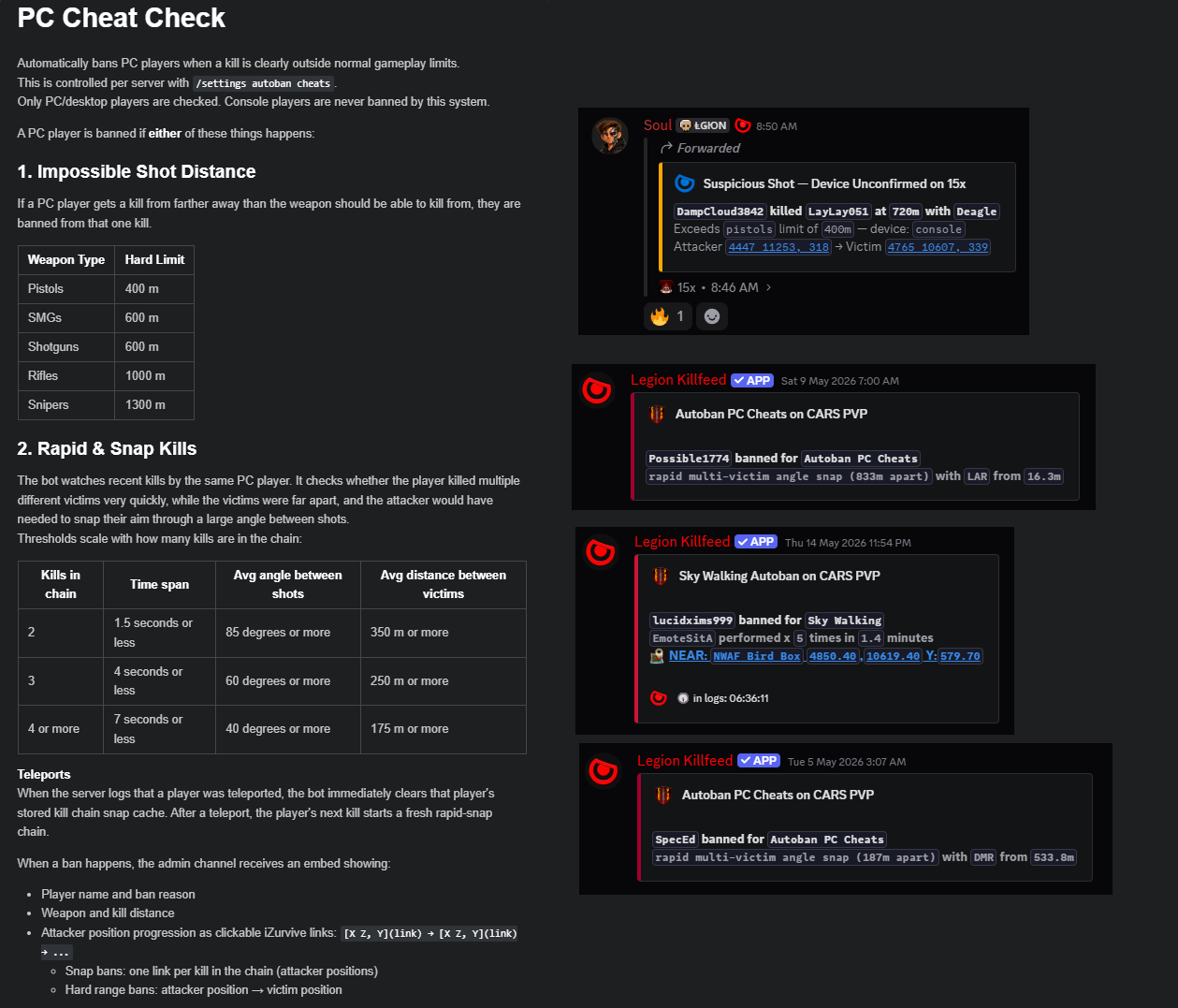
A PC player is banned from one kill if the recorded distance is farther than the weapon class should be able to kill from.
| Weapon Type | Hard Limit |
|---|---|
| Pistols | 400 m |
| SMGs | 600 m |
| Shotguns | 600 m |
| Rifles | 1000 m |
| Snipers | 1300 m |
Legion watches recent kills by the same PC player. It checks whether multiple different victims died very quickly, while far apart, and whether the attacker would have needed to snap through a large angle between shots.
| Kills in chain | Time span | Avg angle | Avg victim spacing |
|---|---|---|---|
| 2 | 1.5 seconds or less | 85 degrees or more | 350 m or more |
| 3 | 4 seconds or less | 60 degrees or more | 250 m or more |
| 4 or more | 7 seconds or less | 40 degrees or more | 175 m or more |
ban_id
bans players by their account ID instead of only their visible name. That matters when players use
name-spoofing cheats or name changes to dodge normal name-based bans.
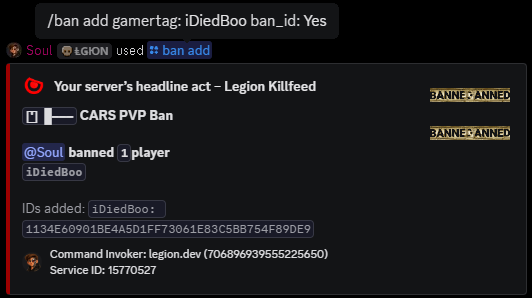
Snap bans include one clickable iZurvive link per kill in the chain, using attacker positions. Hard range bans show attacker position to victim position. Admins can see why the ban happened without reconstructing the raw log manually.
When the combined pattern passes the configured threshold, Legion queues the ban, pushes it to the Nitrado ban list, and posts a clear Discord reason so staff can see why the action happened.
Legion can also enforce zone rules, ban-on-entry areas, skywalking checks, undermap swimming checks, logout rules, kill/death triggers, building triggers and placement triggers depending on server configuration and whitelist rules.
Feature visuals
PC cheat detection and account-ID banning shown as Discord-facing output for staff review.
Visual intelligence
Shows where kills concentrate so owners can see whether the server is producing action in the intended areas or whether one location is swallowing the whole map.
Shows damage activity rather than only deaths, which helps identify common fight locations, suspicious damage clusters and areas where players are trading shots without kills.
Tracks where players are spending time when the data is available, giving owners a better picture of server flow and dead zones.
Pin maps let staff turn useful coordinate data into visual reference points instead of copying raw numbers around Discord.
Last-location tools help staff find player context quickly and link it to iZurvive-style map review. Legion only tracks last locations for online players, keeping it useful without adding overhead.
Semi-real-time status and heatmap updates can be routed to Discord channels, with cleanup settings keeping those channels readable instead of stale.
Feature visuals
Map-based views for kills, PVP activity, server movement and location review.
Base tools
Simple circular zones for base protection, entry alerts, raid visibility and owner-managed tracking around a base centre point.
Polygon radar support allows more accurate boundaries for irregular bases and custom areas instead of forcing every base into a circle.
Ban-on-entry can be used where a server wants strict restricted zones. Staff can use the generated alerts to see who entered and why the system acted.
Owners can manage ignore lists so trusted accounts, staff, builders or specific players do not create useless alerts.
Base damage tracking helps owners understand raids, griefing complaints and structure damage patterns rather than relying on vague player reports.
Alerts can be routed into the channels where staff expect them, keeping base security separate from general killfeed noise.
Feature visuals
Radar and raid visibility views used for base monitoring and staff review.
File tools
Legion can edit cfggameplay.json references from Discord, including Object Spawner, Spawn Gear, Player Restricted Area and economy-related file references. Scheduled edits let owners line changes up with restarts instead of babysitting a server.
The website and bot ecosystem includes XML helpers for common DayZ files so owners can validate, reduce, compare and generate content without blindly guessing.
Validation helps catch broken structure, duplicate issues, bad references and common formatting problems before they waste a restart.
Spawn gear and loadout generation tools help owners create usable player spawn setups faster and with fewer manual formatting errors.
Economy calculators and file helpers support servers that need balanced prices, references and structured output without hand-building every line.
The RPT Debugger groups repeated noise and surfaces actionable errors so owners are not forced to read raw log dumps line by line.
Feature visuals
Examples connected to file work, placement review, teleports, map references and log handling.
Discord systems
Built-in Discord ticketing keeps support in the same server as the rest of the tools. Panels, welcome copy, colours and layout can be styled so tickets feel like part of the community.
Owner, admin, moderator, restarter, whitelister and trader permissions can stay split instead of being dumped into one overpowered role.
Owners can create Discord embeds without needing a separate third-party embed builder.
Linking tools help connect Discord users and gamertags so staff can review player identity and support requests more quickly.
Legion can search associated gamertags, review related accounts, ban or unban linked accounts and flag new alts when the data shows them.
Optional death roasts, community submissions, fight commands and other extras give owners humour and interaction tools without replacing the core moderation features.
Feature visuals
Flag-map and event views used around community modes and server-side activity.
Activity
Tracks top players, servers, weapons, builds and kills.
Player stats are separated enough that servers can understand PVP and PVE activity instead of flattening everything into one meaningless number.
Weapon data helps owners see what is actually being used and how kills are happening across the server.
Custom multipliers can reward kills, builds and raiding, with settings controlled through Discord commands.
Roulette, blackjack, slots, dice-roll, rock paper scissors and coin-flip can be enabled where they fit the community. Owners can disable economy commands that do not suit the server.
Legion is designed so owners can control the server’s feature set from Discord instead of editing scattered config by hand every time.
Feature visuals
Leaderboard views for kills, score and time alive.
Setup
Join the Legion Discord, create or sign in to Ko-fi, open https://ko-fi.com/@LegionKillfeed , subscribe, then invite the bot from the bot profile or setup link. Administrator permissions are expected because the bot creates channels, manages messages and handles setup actions.
Open
https://nitrado.net/
, then go to
My Account
,
Developer Portal
,
Long Life Tokens
,
Login
, tick
service only
, name the token and copy it.
Run
/setup token NITRADO_TOKEN
, then run
/setup channels
. Legion sends channel and server setup tips after the first channel setup runs.
For reactivation, run
/setup token NITRADO_TOKEN
, then
/setup active discord
, then
/setup activate
. After that, use
/settings channels assign
to reconnect channels that still exist in the database.
Frequently Asked Questions
No. Legion’s PC Autobanner first identifies Xbox App / PC-connected players from RPT device data, then checks weapon capability, kill distance, killer and victim coordinates, movement, timing, and snap-angle thresholds before queueing a ban.
The public Ko-fi minimum tier starts at $5.50 USD per month and can cover up to 10 servers per Nitrado account, with higher tiers treated as optional support rather than feature gates.
No. Legion includes feeds, stats, heatmaps, base radar, tickets, moderation tools, Nitrado setup, scheduled file edits, economy tools, leaderboards and linked website utilities.
Console DayZ owners are limited by what Nitrado and DayZ expose. Legion is built around those real limits, so it turns available ADM and RPT data into Discord output, review tools and automation instead of pretending console has PC-style admin access.
No. Legion’s PC Autobanner first identifies Xbox App / PC-connected players from RPT device data, then checks weapon capability, kill distance, killer and victim coordinates, movement, timing, and snap-angle thresholds before queueing a ban.
The public Ko-fi minimum tier starts at $5.50 USD per month and can cover up to 10 servers per Nitrado account, with higher tiers treated as optional support rather than feature gates.
No. Legion includes feeds, stats, heatmaps, base radar, tickets, moderation tools, Nitrado setup, scheduled file edits, economy tools, leaderboards and linked website utilities.
Console DayZ owners are limited by what Nitrado and DayZ expose. Legion is built around those real limits, so it turns available ADM and RPT data into Discord output, review tools and automation instead of pretending console has PC-style admin access.